


8 Ball Brawl: Pool & Billiards
4.5911.00 Reviews
App Specs
- Version
- 1.17
- Updated On
- License
- Free
- Downloads
- 1,000,000+
- Developer
- TapHit Labs
- Categories
- Sports
- Platform
- Android, iOS
Screenshots
 Analysis by AppCompare
I tend to think of a mobile pool game as something to pick up briefly, but a shared phone or tablet changes the question: can it work for different people without turning every match into a long commitment? 8 Ball Brawl: Pool & Billiards is a sports game from TapHit Labs built around digital pool and player-versus-player competition. Its basic appeal is easy to understand, though I’d treat it as a game for taking turns rather than assume it offers household or account-management tools.
A casual match that can fit between other plans
Picture a quiet stretch at home while one person is waiting for dinner and another has a few minutes before heading out. A pool match can make that pause feel more engaging than scrolling, and the familiar rules mean players can get started without learning an elaborate premise. On a shared device, I’d agree on whose turn it is before opening a competitive match; that small bit of coordination avoids leaving someone else’s game or progress in an awkward state.
The player-versus-player focus is a draw if the people using it enjoy testing their aim against another person. It is less suited to a group looking for a party game with several people playing at once: digital pool is naturally a turn-taking activity, and the experience is most appealing when each player can give a shot a little attention. If everyone wants something noisy and immediately social, a couch multiplayer game may be a better fit.
Shared devices call for simple boundaries
I would not treat a shared tablet as if it automatically separates each person’s play. Before handing it over, decide whether the next user should continue the current session or start their own, and avoid assuming that a visible profile or saved progress belongs to the right household member unless you have checked. This is practical housekeeping, not a claim that the game includes household profiles or parental controls.
There is also a useful difference between a quick casual round and a purchase decision. The game is free to download, while optional in-app purchases range from $0.99 to $99.99 per item. On a device used by more than one person, I’d make sure everyone knows that paid items are a separate choice and that the device owner should handle any purchase approval. Players who want a completely purchase-free environment may prefer a game with no in-app buying.
What the competitive angle asks of players
The short description promises mobile pool, but the more useful question is whether you enjoy the pressure of taking a shot while another player is waiting. I find that this kind of head-to-head play rewards patience: take a moment to line up, think about where the cue ball may end up, and resist treating every shot as a chance to hit as hard as possible. That deliberate rhythm is part of the fun, but it may feel slow to someone who wants constant action.
For a household, coordination matters most when players have different expectations. One person may want to practise quietly, while another is eager to compete. Agreeing on whether the device is being used for a solo session or a match with other people is a simple way to avoid frustration. And if a game is interrupted, it’s sensible to check whose turn or session is active before tapping through menus.
Worth Reading Before You Choose

EA SPORTS FC Mobile 26 Is a Bigger Football Game, but It Takes Time

Flipboard Shows What News Apps Must Do Beyond the Feed

Switching to Android Auto Means Rethinking Your Driving Routine

Google Calendar Makes a Crowded Week Easier to Manage

Ludo King Makes the Most of the Minutes Between Plans

Baby Panda World Brings Quick Play to Modern Phones, but Its Game Library Feels Busy
Age context and a sensible level of trust
The game is rated Everyone, which makes its broad audience easier to understand, but an age label is not a substitute for a household’s own rules about screen time, online play, or spending. Because the experience includes social interaction and competitive play, I’d talk with younger players about being considerate to opponents and ask an adult to oversee purchases on a shared device. That advice doesn’t assume any particular chat controls or family settings.
Its audience figures suggest that it has found plenty of players: it has a 4.6 average from around 14,000 ratings and more than 500,000 installs. I see that as a sign of an established pool-game audience, not a guarantee that every match will suit every player. The game is free, but the presence of optional purchases is worth keeping in mind when deciding whether it belongs on a device used by children or guests.
How it fits beside other pool games
Compared with a solitary billiards game focused mainly on practising shots, the appeal here is the competitive, social framing. That can make a routine game feel more lively when another player is involved. In contrast, someone who wants a quiet practice tool, a realistic lesson in table technique, or a game that avoids online interaction may be happier with a straightforward offline pool alternative. I’d choose based on the company and mood, not just on the fact that both options use a cue and balls.
It is also worth being realistic about what mobile pool can do. A touchscreen lets you aim and take a shot conveniently, but it cannot reproduce the physical feel of handling a cue at a real table. If you enjoy billiards chiefly for the movement, sound, and shared space of playing in person, this is a convenient substitute for a spare moment rather than a replacement for the real thing.
First Impressions
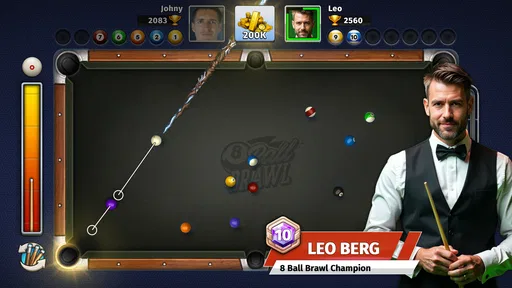
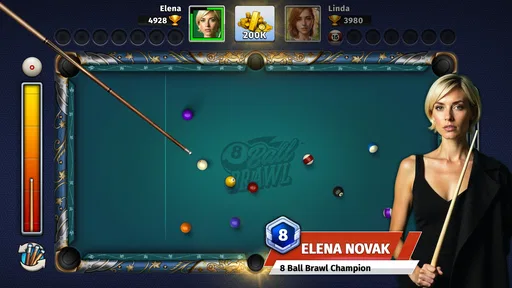
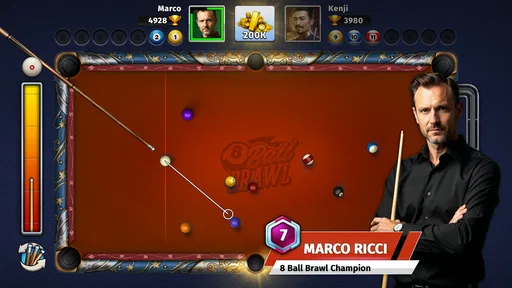
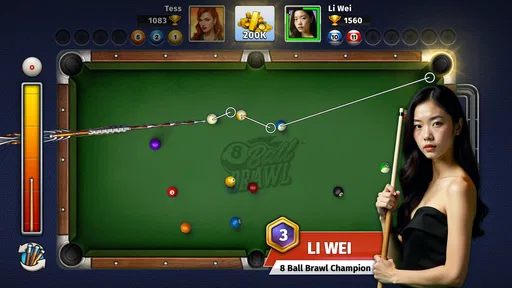
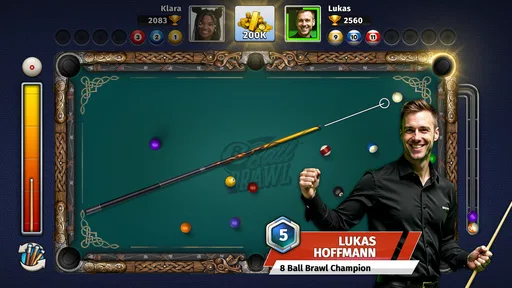
Once I launched 8 Ball Brawl: Pool & Billiards, I was immediately struck by the sleek and user-friendly interface. The graphics are crisp and vibrant, making it a delight to look at. The developers have clearly put a lot of effort into ensuring that the visual experience matches the quality of the gameplay. It’s like having a mini-pool table in your pocket.
Gameplay and Features
The gameplay is smooth and intuitive. Whether you're a seasoned pro or a complete beginner, the app offers a fantastic range of options to suit your skill level. You can play solo to hone your skills or dive into multiplayer mode to challenge friends or players from around the world. The competitive aspect is a real draw, and it kept me coming back for more.
One of the standout features is the variety of game modes. From classic 8-ball to more challenging variations, there’s always something new to try. I found myself particularly hooked on the tournament mode, where the stakes are higher, and the competition is fierce. It’s incredibly satisfying to climb the ranks and see your name among the top players.
Customization Options
Who doesn’t love a bit of customization? 8 Ball Brawl lets you personalize your cue and table with a wide range of styles and colors. It adds a personal touch and lets you show off your unique flair. The in-game shop is stocked with options, and while some items require in-game currency, they’re well worth the investment for the added cool factor.
Controls and Mechanics
The controls are straightforward and responsive. You simply aim your cue, adjust the power, and take your shot. The physics engine is top-notch, accurately simulating the spin and movement of the balls. I was genuinely impressed by how realistic the ball movements felt – it’s as close to the real thing as you can get on a mobile device.
Social and Community Features
What makes 8 Ball Brawl truly engaging is its social component. You can chat with opponents, send friendly taunts, or even join clubs to meet like-minded players. The community aspect adds an extra layer of fun and competition, making each match more than just a game.
Overall Experience
After spending some quality time with 8 Ball Brawl, I can honestly say it’s become one of my go-to apps for unwinding. Whether I’m sneaking in a quick game during a break or settling in for a longer session, it never fails to entertain. The combination of competitive gameplay, customization, and community interaction makes it a standout in the world of mobile pool games.
In practical terms, I’d recommend it most to someone who already enjoys pool and wants a convenient way to play against others, rather than to someone seeking a comprehensive billiards tutor. A beginner can still enjoy it, but learning the feel of a shot on a touchscreen is different from learning at a physical table. If you’re new, start by taking deliberate shots instead of chasing power; noticing how the cue ball moves after contact makes each turn more informative.
The game is free and rated Everyone, and it runs on Android 8.0 or later. It was released on August 29, 2024, and its current version is 1.15. Those details make it straightforward to judge basic compatibility, but they don’t change the main trade-off: the strongest reason to play is the pool match itself, while optional purchases and social competition may not suit every shared-device setup.
There are a few sensible ways to approach the customization and shop elements. I’d first decide whether changing a cue or table actually improves your enjoyment, rather than treating every visible item as something you need to acquire. Cosmetic choices can make a game feel more personal, but they are not the same as improving your real-world technique. On a family device, it is especially helpful to keep the distinction clear so that a younger player does not confuse in-game currency with permission to spend money.
For people comparing it with the usual alternatives, the deciding point is not simply whether one game has more modes or a different table design. Ask what you want from a session. If the goal is a quick competitive challenge, the opponent-facing structure is appealing. If the goal is uninterrupted practice, an offline option can be less distracting; if the goal is to learn proper cue handling, a real table or instructional resource will offer something a touchscreen cannot. I would keep this game for casual digital matches, not as a stand-in for every kind of billiards experience.
One limitation of competitive play is that the quality of a session depends partly on the other person. A patient opponent can make a match feel thoughtful, while a player who treats every exchange as a race may make it less relaxing. The social features add personality, but they also mean this is not the best pick for someone who wants a fully private, solitary experience. If that is your priority, choose a solo-focused pool game instead.
Who I’d hand it to—and who I wouldn’t
I’d suggest it to a friend who likes 8-ball, enjoys friendly rivalry, and is comfortable with a game that may invite more than one quick round. It also makes sense for a household where people are happy to pass a device around and take turns. I would skip it for anyone who wants no in-app purchase options, dislikes playing against other people, or expects a mobile simulation to teach the physical technique of billiards.
Before sharing it, I’d make a small routine of checking which person is using the device, who is responsible for any purchase, and whether a competitive match is welcome at that moment. That is more useful than assuming a game’s general-audience rating answers every household question. With those expectations set, the app can be an easy way to fill a spare few minutes without making the device feel like a permanent shared account.
My household verdict
Overall, I find this a lively mobile pool game for casual competition, especially when the people playing enjoy taking turns and comparing shots. The combination of solo play, multiplayer, customization, and community gives it more to explore than a bare practice table, though the social side and purchase options deserve ordinary household boundaries. If you want a convenient pool match on a break or a relaxed challenge with someone nearby, I’d give it a try. If you need a quiet, purchase-free practice app or a substitute for playing at a real table, another option will fit better.
So, if you’re looking for a new addiction and love the thrill of billiards, give 8 Ball Brawl a shot. It’s a pocket-sized pool hall that’s always open for a game.
Pros
- Simple
- intuitive interface for easy navigation.
- Realistic physics enhance gameplay experience.
- Variety of game modes keeps it engaging.
- Multiplayer option for challenging friends.
- Regular updates with new features.
Cons
- Ads can disrupt the game flow.
- Limited customization for cues.
- In-app purchases can be pricey.
- Occasional connectivity issues.
- Graphics can be improved for realism.
FAQs for 8 Ball Brawl: Pool & Billiards
What is 8 Ball Brawl: Pool & Billiards?
8 Ball Brawl: Pool & Billiards is a mobile game that offers a realistic and immersive pool experience. Players can enjoy various modes, including solo practice, multiplayer challenges, and tournaments. The game features stunning graphics, intuitive controls, and a competitive ranking system that keeps players engaged and motivated.
Is 8 Ball Brawl free to play?
Yes, 8 Ball Brawl is free to download and play on both Android and iOS devices. However, the game includes in-app purchases that allow players to buy items such as cues, table designs, and coins. These purchases can enhance gameplay but are not necessary to enjoy the core features of the game.
What are the system requirements for 8 Ball Brawl?
For Android devices, 8 Ball Brawl requires Android version 5.0 or higher. For iOS users, the game requires iOS 10.0 or later. It's optimized for smooth performance across a range of devices, but ensuring your device meets these minimum requirements will enhance your gaming experience.
Can I play 8 Ball Brawl offline?
8 Ball Brawl offers both online and offline modes. While you can practice and play solo games offline, accessing multiplayer matches, tournaments, and certain features requires an internet connection. This dual mode ensures you can enjoy the game anytime, anywhere, whether connected or not.
How do I improve my skills in 8 Ball Brawl?
Improving in 8 Ball Brawl involves regular practice in solo mode and participating in online matches against other players. Utilizing the tutorial mode can also provide valuable tips and techniques. Additionally, experimenting with different cues and table settings can help refine your strategy and enhance your gameplay.


